New: Axinite Intelligence, AI that gets work done in its own computer. Your first agent is free in ZirconOS. Meet Axinite →
Axinite Intelligence

A team of AI agents that gets work done

Give your agents a goal in Mission Control. A lead agent plans the work, the team does it, and nothing is spent, sent or posted without your yes.

First agent free. More agents $2 a month each. Built into ZirconOS.

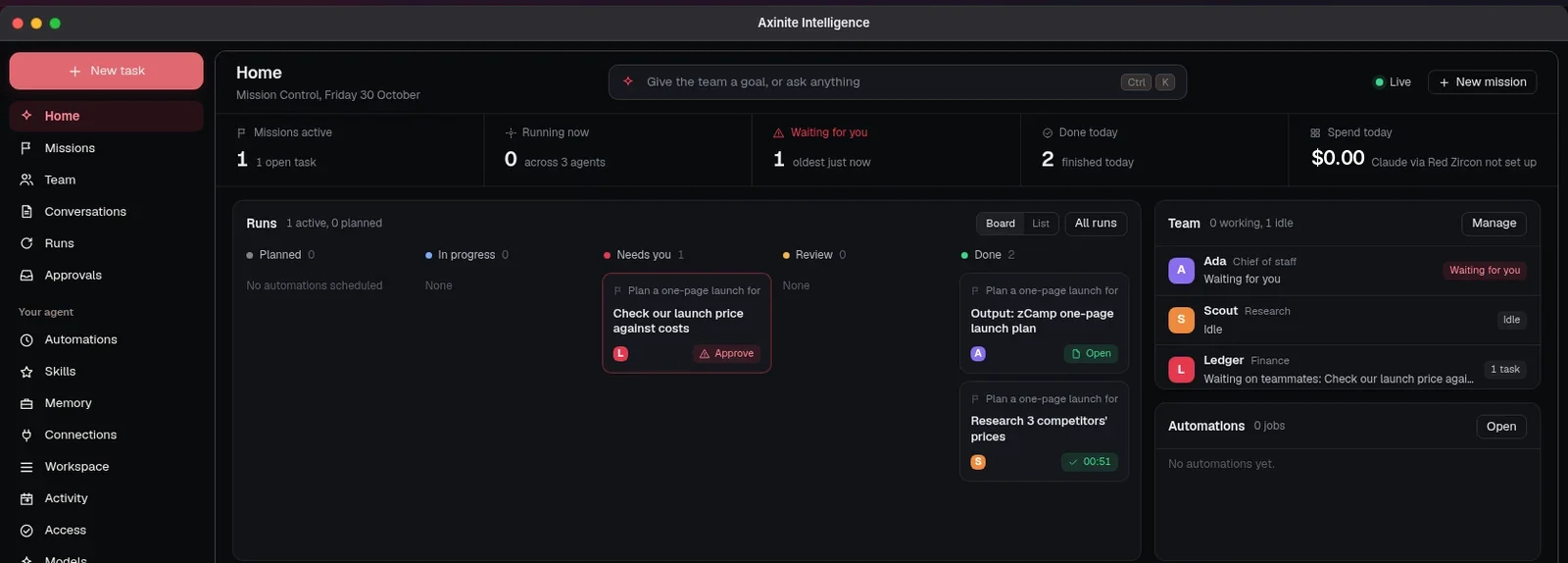
Axinite Mission Control: one mission active, a board of runs with one waiting for approval, a team of three agents and $0.00 spent today

Mission Control: the whole team on one screen

Home shows what is running, what is waiting for you, what finished today and what it cost, with the team’s conversation live underneath.

MissionsGoals your team is working on, each with its own room and limits
Runs boardPlanned, in progress, needs you, in review and done
Waiting for youQuestions and approvals in one place, answered in a click
Spend todayWhat your agents used, against the limits you set

Agent teams that plan, hand off and report back

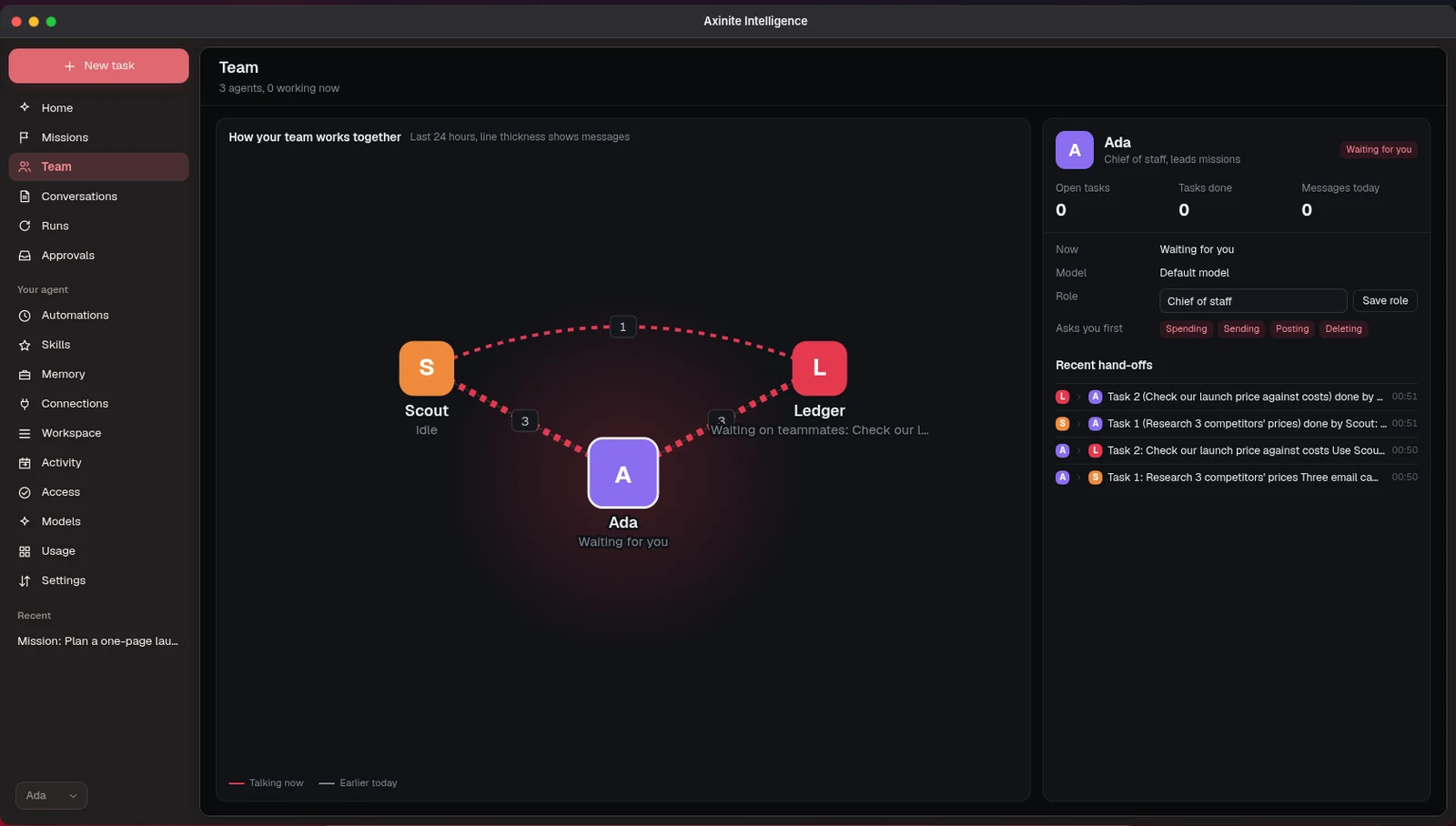
Give a mission to your team. The lead agent breaks it into tasks, assigns each one to the right teammate and brings the results together. Agents message each other and hand work on as they go, and you can follow every step or join the conversation.

  • Roles for each agent, such as chief of staff, research or finance
  • A lead agent that plans the mission and assigns tasks
  • Live messages and hand-offs between agents
  • Results saved to the mission’s folder in your files
The Team page: Ada, chief of staff, in the middle with Scout for research and Ledger for finance, the lines between them showing the messages they sent today, and Ada’s recent hand-offs on the right

Works on your files, and keeps every version

Give an agent access and it reads and edits your ZirconOS documents, spreadsheets and folders directly, the way a colleague would. The finished work is already where you keep it.

Edits in place
Agents create, edit, rename, move and tidy files anywhere in your ZirconOS, including the Desktop.
Every version kept
Each change is saved as a version. Restore an earlier one, or undo an agent’s change in one click from Activity.
Asks when it can’t be undone
Deleting for good, emptying the Trash and sharing a file wait for your yes. Prefer more control? Set an agent to read only, or to ask before every change.

You stay in charge

Agents do the work. You make the decisions that matter.

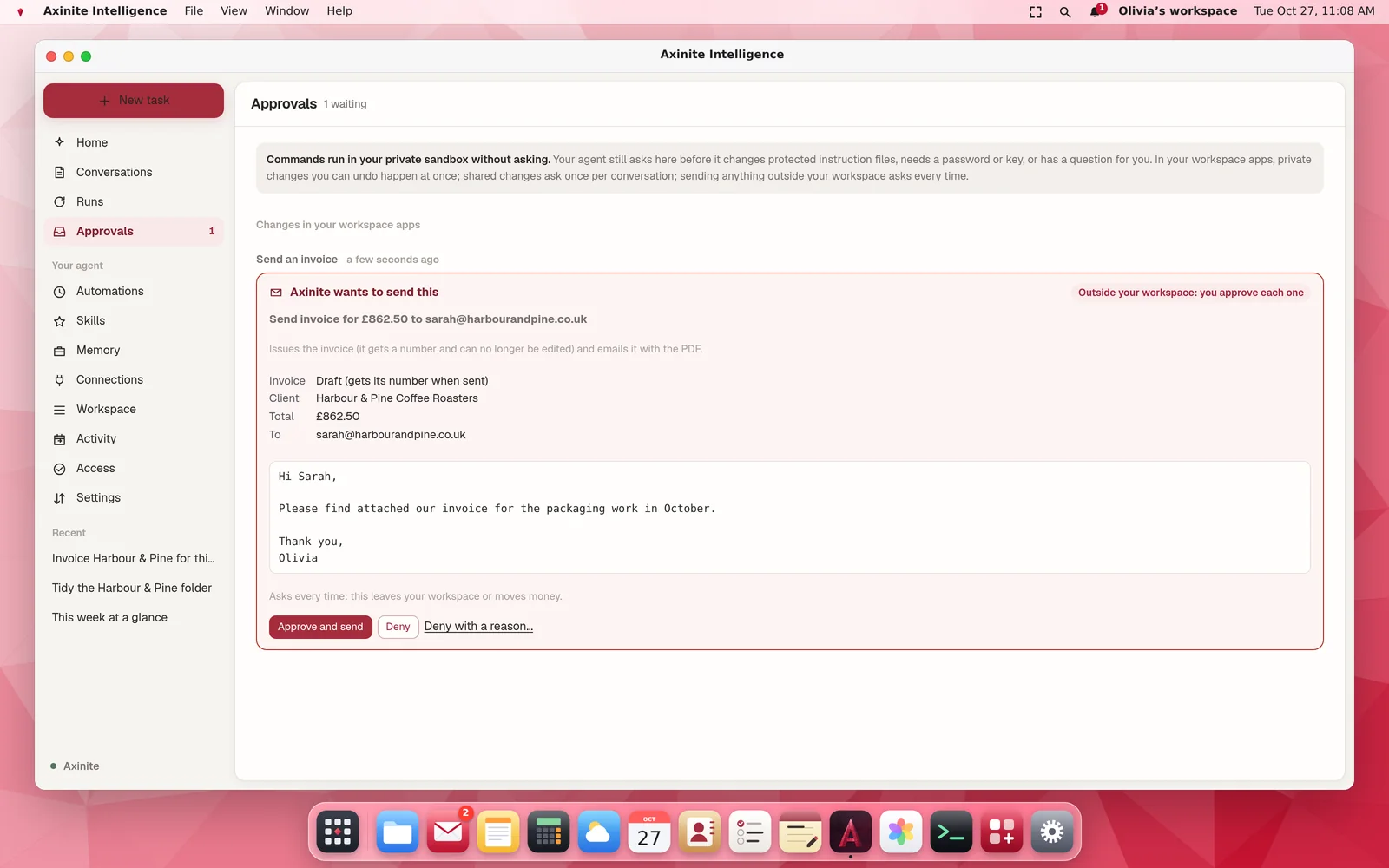
  • Approvals first.Anything that spends money, sends an email or posts for you waits for your yes.
  • Limits per mission.Set how far a mission may go before it stops and asks.
  • A private sandbox per agent.Each agent works in its own isolated computer, never on your devices or in another agent’s space.
  • Access you choose.Decide which ZirconOS apps, mail and calendars each agent may use, and how far it may go with your files.
The Approvals inbox in Axinite Intelligence with an invoice waiting to be approved

Choose the AI behind your agents

Pick a model for each conversation, and a smaller one for background jobs if you like.

Pay as you go

Claude via Red Zircon

Claude models, paid from prepaid Axinite credit. You set daily and monthly limits. When the credit runs out, Claude pauses with a clear message, so there is no surprise bill.

  • Top up from your Red Zircon balance or by invoice
  • Daily and monthly limits
  • Usage per agent, with receipts

Bring your own keys

Add an API key for the AI provider you already use. Your provider bills you directly, and the key is stored encrypted.

Sign in with ChatGPT

Connect your ChatGPT plan and your agents think with it, at no extra charge from Red Zircon.

Built to work like a colleague

Writes like a person

Agents write plainly, like a capable colleague: short, specific and without the filler you expect from AI.

Usage and receipts

The Usage page shows what each agent used, your limits, your credit and a receipt for every top-up.

Works while you don’t

Schedule jobs in plain language, such as a summary every Monday at 9:00, and get the result where you want it.

Developer help

Write, review and maintain code in the agent’s sandbox, with review checkpoints so your team decides what is kept.

Mail, calendar and tasks

With your permission, agents read your mail, plan around your calendar and keep your tasks up to date. Anything they would send waits in Approvals.

Wherever you talk

Chat with your agents in ZirconOS, in KyaChat or by email, and add skills and memory for the way you work.

Questions about Axinite

How do I start?

Open ZirconOS and choose Axinite Intelligence in the Dock. Give your first agent a name and start with a request in plain language. Your first agent is free.

What is a mission?

A goal you give your team, such as “plan the launch of our spring menu”. The lead agent breaks it into tasks, assigns them to teammates and brings the results together, and you follow every step in the mission room.

Can agents spend money or send things on their own?

No. Anything that spends money, sends or posts waits in Approvals until you say yes, and each mission has its own limits.

Can agents change my files?

Yes, if you allow it. Agents read and edit your ZirconOS files directly, and every change is saved as a version you can restore or undo. Deleting for good, emptying the Trash and sharing a file wait for your approval. You can also set an agent to read only, or to ask before every change.

Which AI models can I use?

Claude through Red Zircon, paid as you go from prepaid Axinite credit with daily and monthly limits. You can also bring your own key for the AI provider you prefer, or sign in with ChatGPT to use your ChatGPT plan.

How does Claude via Red Zircon work?

Add credit to Axinite, from your Red Zircon balance or by invoice. Each answer is paid from that credit, you set daily and monthly limits, and the Usage page shows what each agent used, with receipts.

Can other people see my agents?

No. Each agent and its computer belong to your account only.

Can I talk to it outside ZirconOS?

Yes. Your agents can answer you in KyaChat and by email too.

How much does it cost?

Your first agent is free. Additional agents are $2 a month each. AI model use is separate: Claude via Red Zircon is paid from prepaid credit, and your own keys or ChatGPT plan are billed by that provider.

Put your first agent to work today

Your first agent is free. Open ZirconOS and choose Axinite Intelligence in the Dock.

Product updates, without the noise

Occasional news about Red Zircon products. Unsubscribe at any time.